

After the activation of Stock Plus/Equity Plus, you can submit a Pledging Request on the Back Office Portal by following the steps below:
Log in to Back Office >> Select segment Capital Mkt 24-25 >> Request >> Mgn. Pledge >> Click on Process.
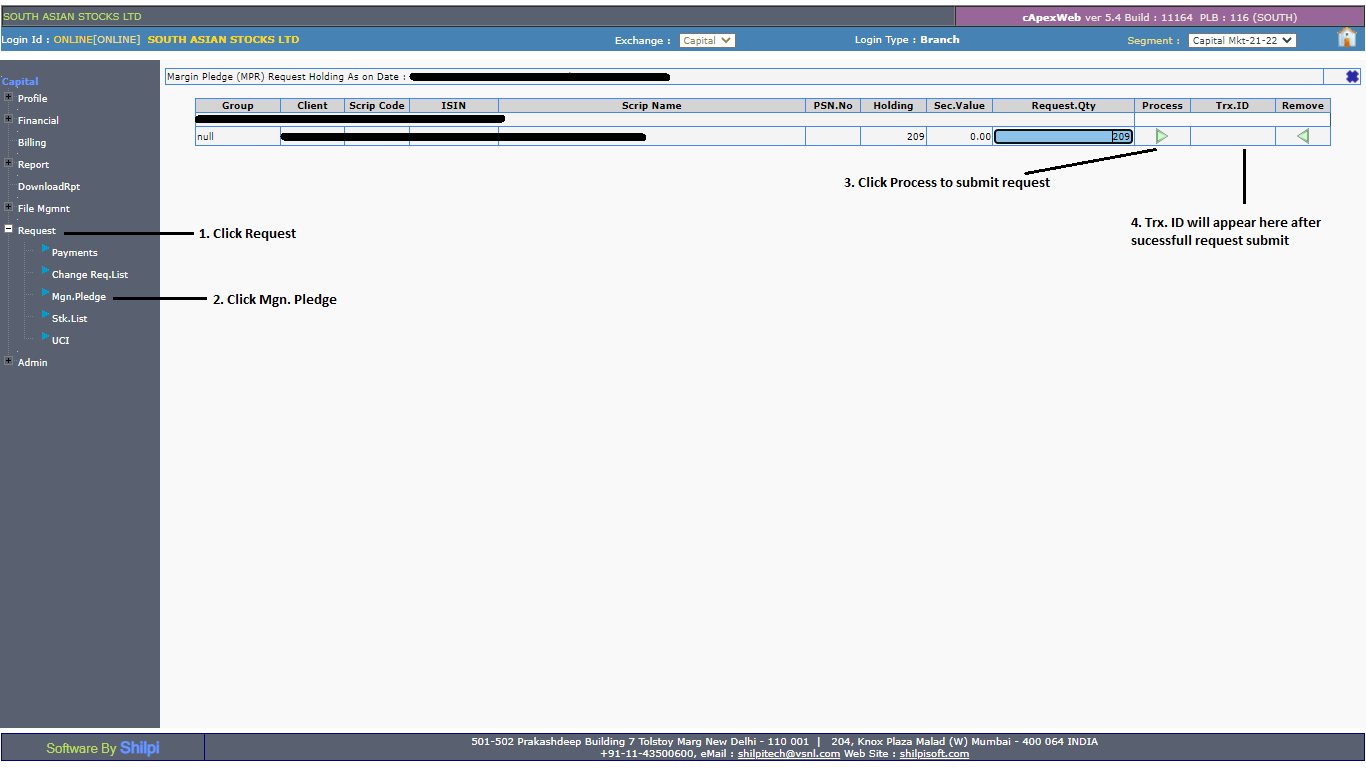
After completing this process, the Stocko team will process your request, and you will receive an Email and SMS for approval from NSDL. For more information, kindly click link.
Note:
- All pledge requests received by 5 PM will be processed on the same day. If the client completes the OTP process by 6:30 PM, they will receive collateral starting the next day for trading. If the request is completed later, the client will receive the collateral benefit the day after.
- As per the circular, all collateral stock and funded stock must be held by way of margin pledge in your DP account itself. For the Stocko MTF (Margin Trading Funding) policy, kindly refer to this link.
